
Your Functional Threshold Power (FTP) represents the maximum average power you can sustain for approximately one hour, making it the cornerstone metric for structured cycling training and race preparation. Understanding how to accurately test your FTP establishes the foundation for setting training zones, tracking performance gains, and optimizing workout intensity across base training and build phases.
An FTP test quantifies the highest power output (measured in watts) your aerobic system can maintain before lactate accumulation forces intensity reduction. This lactate threshold occurs when production exceeds clearance capacity, representing your critical power for sustained efforts.
The test provides the baseline for calculating training stress score (TSS), normalized power (NP), and determining your power curve characteristics. Platforms like Zwift, TrainerRoad, and Wahoo SYSTM all use FTP as the anchor point for structured workouts and sweet spot training intervals.
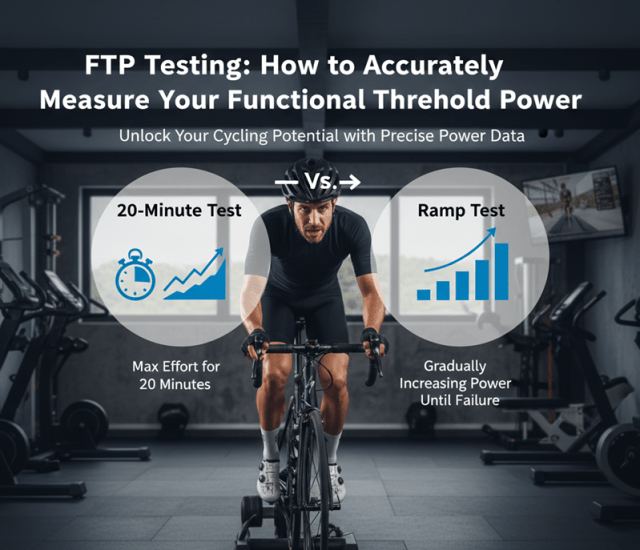
The 20-minute protocol estimates hour power by multiplying your 20-minute average power by 0.95, accounting for small anaerobic contributions.
Protocol:
Ramp tests increase power by 20-25 watts every minute until exhaustion. Your FTP estimates at 75% of peak 1-minute power. Once you have your FTP number, plug it into the zone calculator to get your personalized training zones. This 8-12 minute protocol offers excellent repeatability and works well on smart trainers with ERG mode, though it may favor athletes with superior VO2max relative to threshold power.
Single 8-minute efforts (multiply by 0.90) or dual 8-minute intervals with 10-minute recovery reduce psychological barriers for athletes new to power-based training but introduce greater variability in pacing strategy.

Accurate FTP testing demands reliable power measurement. Power meters use strain gauges positioned in pedals, crank arms, or spiders, with premium models achieving ±1% accuracy.
The Favero Assioma series dominated 2024 power meter sales, offering exceptional accuracy through their IAV (Instantaneous Angular Velocity) system. The Favero Assioma Duo provides dual-sided measurement of left/right leg balance, rechargeable batteries lasting 50+ hours, and seamless pairing with bike computers via ANT+ and Bluetooth connectivity.
Budget-conscious cyclists benefit from the Favero Assioma UNO, measuring left-leg power only while maintaining accuracy within ±1%. For gravel riders and mountain bikers, the Favero Assioma PRO MX-1 features SPD compatibility, IP67 waterproofing, and rugged construction for off-road durability.
Indoor testing on direct-drive smart trainers provides superior control—constant temperature, zero wind resistance, no traffic interruptions, and elimination of coasting during pedal strokes. This environment ensures maximum repeatability for tracking fitness improvements through polarized training cycles.
Outdoor testing better reflects real-world performance but introduces variables affecting power curve analysis. Select sustained climbs or time trial courses with minimal stops if testing outside.
Training Load: Complete your last high-intensity session 48 hours before testing. Previous day should be easy endurance riding or rest to avoid residual fatigue.
Nutrition: Consume 6-8 grams carbohydrates per kilogram bodyweight for glycogen loading. Test in a fed state, 2-3 hours after a moderate meal.
Hydration: Begin well-hydrated. Even 2% bodyweight dehydration reduces critical power output.
Warm-Up (15 minutes):
Primer Effort: Execute maximal 5-minute effort to activate fast-twitch fibers and establish metabolic steady-state.
Recovery: 10 minutes easy spinning at conversational pace.
20-Minute Test: Start at 95-100% estimated FTP. Monitor your bike computer continuously. The final 5 minutes demand complete mental focus as lactate accumulation peaks. Maintain consistent cadence (85-95 RPM typical) and avoid premature intensity reduction.
Cool-Down: 10-15 minutes progressive reduction to facilitate recovery.

Multiply 20-minute average power by 0.95. Example: 250 watts × 0.95 = 237.5 watts FTP.
Divide FTP by bodyweight (kg) for watts/kg—the key metric for climbing performance. Strong amateur cyclists achieve 3.5-4.0 watts/kg, while elite racers exceed 5.5 watts/kg.
Your FTP determines all training zones for structured workouts:
These zones enable precise interval training, proper base building during off-season preparation, and effective periodization through build and race phases. HERE IS YOUR FTP CALCULATOR
Retest every 4-8 weeks during intensive training blocks. More frequent testing disrupts training continuity; longer intervals risk training at incorrect intensities as fitness adapts.
Inadequate warm-up underestimates FTP by 5-15 watts. Pacing errors—starting too hard or too conservatively—compromise accuracy. Environmental inconsistency between tests obscures true fitness changes. Testing when mentally fatigued produces artificially low values unrepresentative of physiological capacity.
Equipment calibration matters: Always zero/calibrate your power meter before testing. Temperature compensation and proper installation ensure data consistency across training sessions.
How often should I test my FTP?
Test FTP every 4-6 weeks during active training when you expect improvements. More frequent testing (weekly) wastes training time and creates unnecessary fatigue. Less frequent testing (8+ weeks) means training with outdated zones that limit progress. Retest after training breaks exceeding two weeks, at season start, and before major events requiring accurate power zones.
Can I test FTP without a power meter?
No reliable FTP test exists without direct power measurement. Heart rate varies too much day-to-day from hydration, sleep, stress, and temperature. Virtual power from speed-based trainers lacks accuracy for testing. Invest in pedal-based power meters like Favero Assioma or crank-based options like 4iiii for accurate FTP testing and training.
Why is the 20-minute test multiplied by 0.95?
The 0.95 multiplier accounts for the difference between 20-minute maximal power and true 60-minute sustainable power. Most cyclists produce 5% more power over 20 minutes than they could sustain for a full hour due to anaerobic contribution. The multiplier converts 20-minute power into estimated one-hour FTP. Elite athletes may use 0.93-0.94 while beginners might use 0.96.
What if my FTP test results seem too low or too high?
Retest if results differ dramatically from expectations. Common causes of low results include inadequate warm-up, insufficient recovery before testing, nutritional deficits, or pacing errors starting too hard. High results typically indicate insufficient effort duration—20 minutes is genuinely maximal and should feel unsustainable beyond the test period. Compare multiple tests over weeks to establish reliable trends.

James Hickman is a former USA Cycling Expert-level coach who has worked with cyclists at every level, from beginners to competitive racers. He served as a coach for the Leukemia & Lymphoma Society’s Team In Training program, helping riders prepare for and complete century events. A Masters-category racer himself, he competed and earned podium finishes in Southern California events and holds a Platinum finish at El Tour de Tucson, completing the century in under five hours.